
🎮 App Store Intelligence
Phantom Words
Fleon Labs · Games
Rating
4.8 ★
20 ratings
Price
$2.99
US storefront
Size
130.5 MB
v1.3
Age Rating
4+
1 languages
Categories
Games
Education
Puzzle
Word
Daily chart position by storefront
()
Tracking since 22 Sep 2026 · lower is better · hover a point for the exact date and rank
Description
We made Phantom Words for anyone who loves that small, satisfying moment when a jumble of letters suddenly turns into a word.
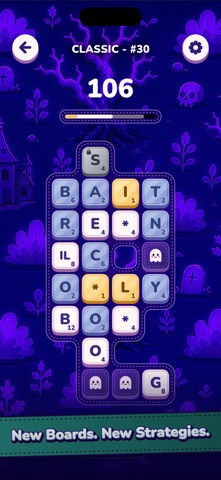
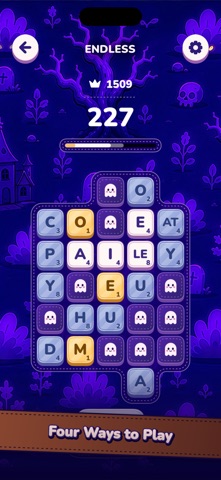
Each board begins scrambled, with most of the letters hidden behind ghost tiles. Slide rows and columns like a 2D Rubik’s Cube, then look for words running across or down the board. Whenever you make one using a tile for the first time, another letter appears. Once every tile is used, the puzzle is complete.
Longer words are worth more, while tiles lose value each time you use them. Yellow means a tile is nearly spent; red means you’ve leaned on it too often. Later boards introduce gaps that split rows and columns, multi-letter tiles that keep their letters together, wildcards that can stand in for any letter, and locked tiles that stay fixed until you use them in a word. And if a solution feels messy, you can always come back and find a more elegant one.
There are four ways to play:
• Classic has 99 handmade levels with increasing difficulty and evolving mechanics.
• Endless starts small and procedurally grows while you play.
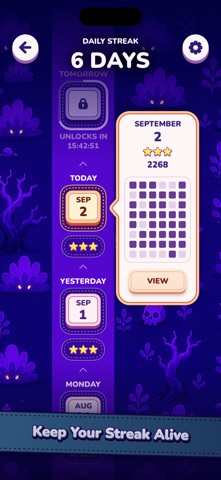
• Daily Challenge gives everyone a new board each day, plus a streak to keep going.
• Lightning Mode is the same word hunting, but against the clock.
Classic, Endless, and Daily Challenge aren’t timed, so there’s no rush. You get a full score breakdown after each level and can replay it whenever you want. Your progress and settings sync across your devices with iCloud. There are also Game Center leaderboards if you care about high scores.
We hope you enjoy discovering the words we’ve hidden for you.
Each board begins scrambled, with most of the letters hidden behind ghost tiles. Slide rows and columns like a 2D Rubik’s Cube, then look for words running across or down the board. Whenever you make one using a tile for the first time, another letter appears. Once every tile is used, the puzzle is complete.
Longer words are worth more, while tiles lose value each time you use them. Yellow means a tile is nearly spent; red means you’ve leaned on it too often. Later boards introduce gaps that split rows and columns, multi-letter tiles that keep their letters together, wildcards that can stand in for any letter, and locked tiles that stay fixed until you use them in a word. And if a solution feels messy, you can always come back and find a more elegant one.
There are four ways to play:
• Classic has 99 handmade levels with increasing difficulty and evolving mechanics.
• Endless starts small and procedurally grows while you play.
• Daily Challenge gives everyone a new board each day, plus a streak to keep going.
• Lightning Mode is the same word hunting, but against the clock.
Classic, Endless, and Daily Challenge aren’t timed, so there’s no rush. You get a full score breakdown after each level and can replay it whenever you want. Your progress and settings sync across your devices with iCloud. There are also Game Center leaderboards if you care about high scores.
We hope you enjoy discovering the words we’ve hidden for you.
Screenshots


Recent reviews (US)
No reviews collected for this app yet — review sampling is currently limited to apps ranked in the US Top 100 (Top Free, Top Paid or Top Grossing) to stay within Apple's request limits.
Chart presence — 0 Top 100 positions
Not currently in the Top 100 of any tracked chart.
Also listed in the genre charts of 1 other storefront, outside the Top 100 — no meaningful position to show.
Ratings by country — 1 storefront
| Storefront | Rating | Rating Count | Price |
|---|---|---|---|
| United States | 4.8 ★ | 20 | Free |
Details
App Store data shown here is sourced from Apple's public iTunes RSS chart feeds and the iTunes Lookup API, collected by Zing at regular intervals. Figures may differ from Apple's internal App Store Connect analytics.
Explore App Store Intelligence