
Calculator ft+
App Store ID 6804355721 · MARCELO MEJIA COBO
Not currently in Zing's Top 100
About
Calculator ft+ is two machines on one screen.
THE CONSTRUCTION CALCULATOR
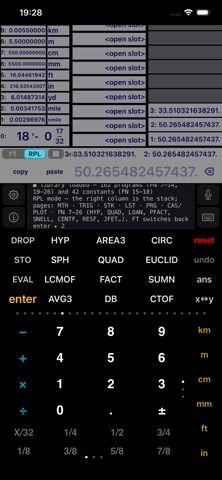
An RPN calculator with a real dimensional engine. Enter 5.5 m + 6.5 ft and get 7.4812 m — the first unit you enter wins, and every value converts live to km, m, cm, mm, ft, in, yd, mile and nautical mile while a tape-measure readout shows feet, inches and 64ths. Multiply two lengths and you get a true area; take the square root of an area and you are back to a length. Mass times gravity reads in newtons. Type "5 ft 3 1/4 in" — or say it out loud — and it lands as a real length. Press-hold any value to edit it on a construction keyboard with every unit, constant and tape fraction.
THE RPL COMPUTER
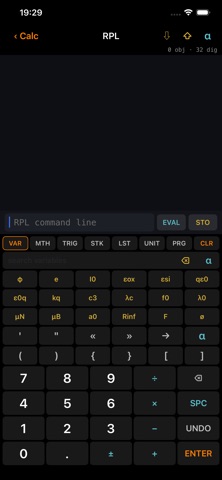
Flip the FT|RPL switch and the same screen becomes an RPL machine in the spirit of the great HP handhelds, powered by the open-source newRPL engine: an unlimited typed object stack (reals at 32-digit precision, lists, unit objects, programs, algebraics), soft menus, programs you can store under a name and run from the VAR menu, engine-sampled function plotting, and a symbolic CAS that expands, differentiates and solves. A full RPL workspace is one tap away in Settings — same engine, same memory.
BUILT TO TEACH
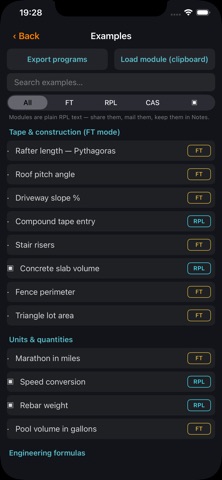
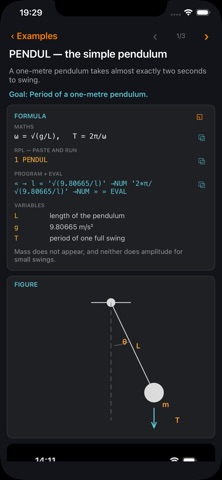
A hundred and ninety worked examples ship inside, searchable and filterable — from rafter lengths and stair risers to beam deflection, Reynolds numbers and voltage drop, plus a twenty-program RPL course, a ten-graph plotting workbook, and the whole HP equation library in 86 programs — optics, oscillations, magnetism, waves, motion, forces, electricity, gases, heat transfer, columns and beams, stress, fluids and solid state devices. Each is solved keystroke by keystroke — every key drawn as its own chip, ringed on a screenshot of the calculator — and carries a formula card you can copy: the equation as written on paper, the one-line RPL that runs it, the program's source ready to paste and run, and what every symbol means. Ninety-one also carry a lettered reference diagram. One tap stores any example program under its name. Export your programs as plain-text modules, load modules from the clipboard, and read the full 27-chapter illustrated field manual in English or Spanish.
ALSO IN THE BOX
• 18 unit-aware memory slots and an unlimited history stack, all persistent
• A help feed that narrates every step — sessions export to PDF
• Customizable prime keys and a drag-to-reorder unit column
• Voice and typed requests, on-device
• 42 physical constants as real unit quantities, and 267 soft-menu commands
• The nine-row converter works for any quantity — type 50 kg and read grams,
tonnes, pounds, ounces, slugs and grains
• On iPad the example pages run two columns with the screenshot pinned
• Runs on iPhone and iPad
Calculator ft+ contains open-source software: newRPL (BSD 3-clause), SymEngine (MIT) and portions of Boost (BSL-1.0). Licenses are reproduced in the app.
Screenshots

This app isn't currently charting in Zing's tracked Top 100 — showing a live snapshot from the App Store instead. Browse current charts →