
📱 App Store Intelligence
Procreate Pocket
Savage Interactive Pty Ltd · Graphics & Design
Rating
3.8 ★
13k ratings
Price
$5.99
US storefront
Size
371.6 MB
v4.0.19
Age Rating
4+
18 languages
Categories
Graphics & Design
Productivity
Daily chart position by storefront
Top Paid (Apps)
Tracking since 6 Apr 2026 · lower is better · hover a point for the exact date and rank
Description
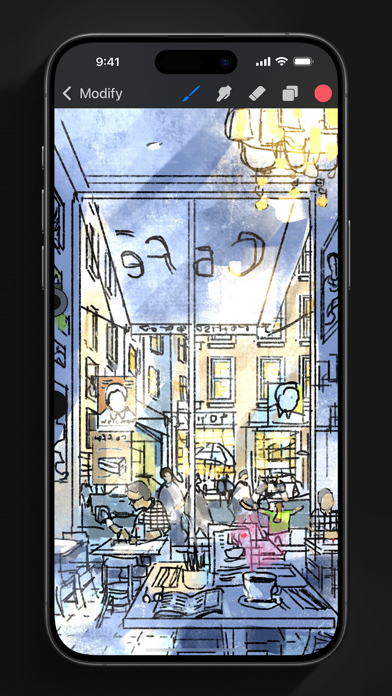
App of the Year winner Procreate Pocket is the most feature-packed and versatile art app ever designed for iPhone.
Procreate Pocket has everything you need to create expressive sketches, rich paintings, gorgeous illustrations, and beautiful animations. Offering hundreds of handmade brushes, a suite of intuitive artistic tools, an advanced layer system, and the powerful Valkyrie graphics engine. Work on the couch, on the train, at the beach, or while waiting in line for coffee.
It’s a complete art studio in the palm of your hand.
Highlights:
• High resolution canvases — up to 16k by 4k on compatible devices
• Intuitive Dark Mode interface made for iPhone
• Revolutionary QuickShape feature for perfect shapes
• Smooth and responsive smudge sampling
• Powered by Valkyrie, the lightning-fast 64-bit painting engine
• Create art in stunning 64-bit color
• 250 levels of undo and redo
• Continuous auto-save — never lose work again
Breakthrough brushes:
• Packed with 100s of beautifully crafted brushes
• Brush sets keep your painting, sketching, and drawing brushes organized
• Over 100 customizable settings for every brush
• Brush Studio — design custom brushes
• Import and export custom Procreate brushes
• Import Adobe® Photoshop® brushes, and run them faster than Photoshop®
Full-featured layering system:
• Layer your art for precise control over details and composition
• Create Layer and Clipping Masks for non-destructive editing
• Stay organized by combining layers into groups
• Transform objects simultaneously across multiple layers
• Access over 25 layer blend modes for industry-grade compositing
Color without compromise:
• Fill your line work with ColorDrop
• Disc, Classic, Harmony, Value, and Palette color panels
• Import color profiles for color matching
• Assign Color Dynamics to any brush
Precision design tools:
• Add vector text to your illustrations
• Easily import all your favorite fonts
• Crop and resize your canvas for perfect composition
• Perspective, isometric, 2D, and symmetry visual guides
• Drawing Assist perfects your strokes in real time
• StreamLine smooths your strokes for beautiful lettering and expert inking
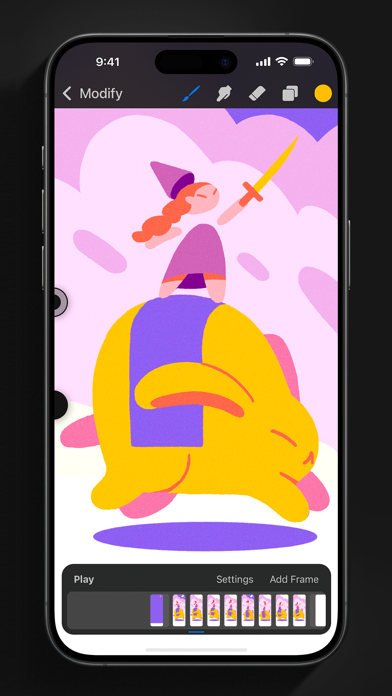
Animation Assist:
• Easy frame-by-frame animation with customizable onion skinning
• Create storyboards, GIFs, animatics, and simple animations
• Export your animations in the full resolution of your canvas
Dramatic finishing effects:
• Gradient Map — remap your image’s colors with a customizable gradient
• Glitch, Chromatic Aberration, Glow, and Halftone to add new dimensions to your work
• Gaussian and Motion Blur filters for depth and movement, or use Sharpen for perfect clarity
• Advanced Noise filter gives you more control for a classic, retro look
• Adjust Hue, Saturation, or Brightness in real time
• Powerful image adjustments including Color Balance, Curves, and HSB
• Bring your art to life with the fun, intuitive, and creative Warp, Symmetry, and Liquify Dynamics
Time-lapse replay:
• Relive your creative journey with Procreate's celebrated Time-lapse Replay
• Export your Time-lapse recording in 4K for high-end video production
• Share a short, 30-second version of your Time-lapse on your socials
Reference Companion:
• Keep a full canvas or reference image with you at all times
• Paint on your face with AR
• Color-pick right from the reference window
Import assets and share your creations:
• Import or export your art as Adobe® Photoshop® PSD files
• Import Adobe® ASE and ACO Color Palettes
• Import images files such as JPG, PNG, and TIFF
• Drag and drop artworks, brushes, palettes, and fonts between applications• Export to AirDrop, iCloud Drive, Photos, iTunes, Dropbox, Google Drive, Facebook, X (formerly Twitter), Instagram, TikTok, Weibo, Mail, and more
• Share your art as PDF, JPEG, PNG, TIFF, GIF, HEVC, or MP4 files
Procreate Pocket has everything you need to create expressive sketches, rich paintings, gorgeous illustrations, and beautiful animations. Offering hundreds of handmade brushes, a suite of intuitive artistic tools, an advanced layer system, and the powerful Valkyrie graphics engine. Work on the couch, on the train, at the beach, or while waiting in line for coffee.
It’s a complete art studio in the palm of your hand.
Highlights:
• High resolution canvases — up to 16k by 4k on compatible devices
• Intuitive Dark Mode interface made for iPhone
• Revolutionary QuickShape feature for perfect shapes
• Smooth and responsive smudge sampling
• Powered by Valkyrie, the lightning-fast 64-bit painting engine
• Create art in stunning 64-bit color
• 250 levels of undo and redo
• Continuous auto-save — never lose work again
Breakthrough brushes:
• Packed with 100s of beautifully crafted brushes
• Brush sets keep your painting, sketching, and drawing brushes organized
• Over 100 customizable settings for every brush
• Brush Studio — design custom brushes
• Import and export custom Procreate brushes
• Import Adobe® Photoshop® brushes, and run them faster than Photoshop®
Full-featured layering system:
• Layer your art for precise control over details and composition
• Create Layer and Clipping Masks for non-destructive editing
• Stay organized by combining layers into groups
• Transform objects simultaneously across multiple layers
• Access over 25 layer blend modes for industry-grade compositing
Color without compromise:
• Fill your line work with ColorDrop
• Disc, Classic, Harmony, Value, and Palette color panels
• Import color profiles for color matching
• Assign Color Dynamics to any brush
Precision design tools:
• Add vector text to your illustrations
• Easily import all your favorite fonts
• Crop and resize your canvas for perfect composition
• Perspective, isometric, 2D, and symmetry visual guides
• Drawing Assist perfects your strokes in real time
• StreamLine smooths your strokes for beautiful lettering and expert inking
Animation Assist:
• Easy frame-by-frame animation with customizable onion skinning
• Create storyboards, GIFs, animatics, and simple animations
• Export your animations in the full resolution of your canvas
Dramatic finishing effects:
• Gradient Map — remap your image’s colors with a customizable gradient
• Glitch, Chromatic Aberration, Glow, and Halftone to add new dimensions to your work
• Gaussian and Motion Blur filters for depth and movement, or use Sharpen for perfect clarity
• Advanced Noise filter gives you more control for a classic, retro look
• Adjust Hue, Saturation, or Brightness in real time
• Powerful image adjustments including Color Balance, Curves, and HSB
• Bring your art to life with the fun, intuitive, and creative Warp, Symmetry, and Liquify Dynamics
Time-lapse replay:
• Relive your creative journey with Procreate's celebrated Time-lapse Replay
• Export your Time-lapse recording in 4K for high-end video production
• Share a short, 30-second version of your Time-lapse on your socials
Reference Companion:
• Keep a full canvas or reference image with you at all times
• Paint on your face with AR
• Color-pick right from the reference window
Import assets and share your creations:
• Import or export your art as Adobe® Photoshop® PSD files
• Import Adobe® ASE and ACO Color Palettes
• Import images files such as JPG, PNG, and TIFF
• Drag and drop artworks, brushes, palettes, and fonts between applications• Export to AirDrop, iCloud Drive, Photos, iTunes, Dropbox, Google Drive, Facebook, X (formerly Twitter), Instagram, TikTok, Weibo, Mail, and more
• Share your art as PDF, JPEG, PNG, TIFF, GIF, HEVC, or MP4 files
Screenshots


Recent reviews (US)
Rating
Show
★★★★☆
15 Oct 2026
Undo/redo button glitch
Pressing redo/undo sometimes lags and doesnt undo/redo.
★★★★☆
15 Oct 2026
procreate pocket
love procreate. but please, we need a lock button for the brush size. and left handed mode. my hand keeps messing up the brush.
★★★★☆
12 Oct 2026
Bug
Hi I think there's a bug that needs to be fixed, the app is kicking me out and whenever I enter a canva pls fix it
★★★★☆
11 Oct 2026
Too much lag
I remembered that I was going to start my animation it kicked me off the second I was going to do so, your app is great but if you fix that one bug you can achieve my 5 star.😁
★☆☆☆☆
9 Oct 2026
App stole $6
Downloaded app for free never even opened it. Woke up realized i couldnt download apps because i owed apple. Thes mf charged me $6 bucks for nothing
Chart presence — 55 Top 100 positions
| Storefront | Category | Chart | Rank |
|---|---|---|---|
| Qatar | Apps | Top Paid | #7 |
| Kuwait | Apps | Top Paid | #14 |
| United States | Apps | Top Paid | #14 |
| United Arab Emirates | Apps | Top Paid | #15 |
| Argentina | Apps | Top Paid | #16 |
| Singapore | Apps | Top Paid | #16 |
| Israel | Apps | Top Paid | #18 |
| Canada | Apps | Top Paid | #19 |
| France | Apps | Top Paid | #19 |
| Indonesia | Apps | Top Paid | #20 |
| Malaysia | Apps | Top Paid | #21 |
| Netherlands | Apps | Top Paid | #21 |
| Latvia | Apps | Top Paid | #22 |
| Thailand | Apps | Top Paid | #22 |
| Vietnam | Apps | Top Paid | #22 |
| South Africa | Apps | Top Paid | #22 |
| Australia | Apps | Top Paid | #23 |
| Denmark | Apps | Top Paid | #23 |
| Sweden | Apps | Top Paid | #23 |
| Mexico | Apps | Top Paid | #25 |
| Taiwan | Apps | Top Paid | #25 |
| China | Apps | Top Paid | #27 |
| Oman | Apps | Top Paid | #28 |
| Spain | Apps | Top Paid | #29 |
| New Zealand | Apps | Top Paid | #29 |
| Greece | Apps | Top Paid | #30 |
| Chile | Apps | Top Paid | #32 |
| Saudi Arabia | Apps | Top Paid | #32 |
| United Kingdom | Apps | Top Paid | #33 |
| Hong Kong | Apps | Top Paid | #33 |
| Bahrain | Apps | Top Paid | #36 |
| Austria | Apps | Top Paid | #38 |
| Nigeria | Apps | Top Paid | #39 |
| Brazil | Apps | Top Paid | #40 |
| Poland | Apps | Top Paid | #45 |
| Germany | Apps | Top Paid | #48 |
| Romania | Apps | Top Paid | #48 |
| Russia | Apps | Top Paid | #48 |
| Pakistan | Apps | Top Paid | #50 |
| Portugal | Apps | Top Paid | #51 |
| Belgium | Apps | Top Paid | #52 |
| Italy | Apps | Top Paid | #52 |
| Ukraine | Apps | Top Paid | #53 |
| Czech Republic | Apps | Top Paid | #55 |
| Croatia | Apps | Top Paid | #55 |
| Hungary | Apps | Top Paid | #56 |
| Philippines | Apps | Top Paid | #59 |
| Switzerland | Apps | Top Paid | #65 |
| Japan | Apps | Top Paid | #65 |
| Norway | Apps | Top Paid | #66 |
| Ireland | Apps | Top Paid | #72 |
| Iceland | Apps | Top Paid | #77 |
| Colombia | Apps | Top Paid | #80 |
| India | Apps | Top Paid | #84 |
| Turkey | Apps | Top Paid | #98 |
Ratings by country — 55 storefronts
| Storefront | Rating | Rating Count | Price |
|---|---|---|---|
| United States | 3.8 ★ | 13k | Free |
| China | 3.7 ★ | 3k | Free |
| United Kingdom | 3.7 ★ | 2k | Free |
| Canada | 3.9 ★ | 1k | Free |
| Russia | 4.0 ★ | 957 | 499,00 ₽ |
| Australia | 3.9 ★ | 714 | Free |
| Germany | 3.9 ★ | 654 | 6,99 € |
| Sweden | 4.0 ★ | 547 | 79,00 kr |
| Brazil | 3.9 ★ | 514 | Free |
| Mexico | 3.6 ★ | 483 | Free |
| France | 4.1 ★ | 425 | 6,99 € |
| Japan | 4.0 ★ | 398 | Free |
| Netherlands | 3.9 ★ | 334 | Free |
| Norway | 4.0 ★ | 334 | 79,00 kr |
| Saudi Arabia | 4.2 ★ | 254 | Free |
| Philippines | 4.2 ★ | 247 | Free |
| Indonesia | 4.1 ★ | 243 | Free |
| Italy | 3.8 ★ | 224 | 6,99 € |
| Thailand | 3.9 ★ | 222 | Free |
| Spain | 3.9 ★ | 197 | 6,99 € |
| Denmark | 3.9 ★ | 190 | 49,00 kr |
| Taiwan | 4.0 ★ | 188 | Free |
| Turkey | 4.1 ★ | 185 | Free |
| Israel | 4.0 ★ | 153 | Free |
| Switzerland | 4.1 ★ | 148 | Free |
| Ukraine | 3.8 ★ | 146 | 6,99 USD |
| Poland | 4.0 ★ | 136 | 29,99 zł |
| Chile | 3.6 ★ | 129 | Free |
| United Arab Emirates | 4.2 ★ | 120 | Free |
| India | 4.1 ★ | 120 | Free |
| Vietnam | 4.2 ★ | 120 | 199.000đ |
| Ireland | 3.8 ★ | 105 | Free |
| Belgium | 4.0 ★ | 103 | 6,99 € |
| Austria | 4.0 ★ | 94 | 6,99 € |
| Argentina | 3.9 ★ | 88 | Free |
| Malaysia | 3.9 ★ | 85 | Free |
| South Africa | 4.0 ★ | 81 | Free |
| New Zealand | 3.5 ★ | 80 | Free |
| Colombia | 4.1 ★ | 75 | Free |
| Hong Kong | 3.6 ★ | 75 | Free |
| Romania | 4.1 ★ | 71 | 29,99 lei |
| Czech Republic | 4.3 ★ | 64 | 149,00 Kč |
| Singapore | 3.6 ★ | 47 | Free |
| Portugal | 3.4 ★ | 43 | 6,99 € |
| Hungary | 4.7 ★ | 42 | Free |
| Kuwait | 4.2 ★ | 29 | Free |
| Greece | 4.5 ★ | 23 | 6,99 € |
| Latvia | 4.2 ★ | 21 | 6,99 € |
| Croatia | 4.5 ★ | 19 | 6,99 € |
| Bahrain | 3.8 ★ | 15 | Free |
| Pakistan | 4.2 ★ | 14 | Free |
| Iceland | 4.2 ★ | 13 | Free |
| Nigeria | 4.2 ★ | 13 | Free |
| Qatar | 4.2 ★ | 13 | Free |
| Oman | 4.2 ★ | 9 | Free |
Details
App Store data shown here is sourced from Apple's public iTunes RSS chart feeds and the iTunes Lookup API, collected by Zing at regular intervals. Figures may differ from Apple's internal App Store Connect analytics. Reviews are sourced from Apple's public customer-reviews feed (US storefront, most recent first).
Explore App Store Intelligence