
📱 App Store Intelligence
Microsoft Authenticator
Microsoft Corporation · Productivity
Rating
4.7 ★
712k ratings
Price
Free
US storefront
Size
225.6 MB
v6.8.56
Age Rating
4+
42 languages
Categories
Productivity
Utilities
Daily chart position by storefront
Top Free (Apps)
Tracking since 6 Apr 2026 · lower is better · hover a point for the exact date and rank
Description
Use Microsoft Authenticator for easy, secure sign-ins for all your online accounts using multi-factor authentication, passwordless, or password autofill. You also have additional account management options for your Microsoft personal, work or school accounts.
Getting started with multi-factor authentication
Multi factor authentication (MFA)provides a second layer of security. When enabled, during login after entering your password, you’ll be asked for an additional way to prove it’s really you. Either approve the notification sent to the Microsoft Authenticator, or enter the one-time password (OTP) generated by the app. The OTP codes have a 30 second timer counting down. This timer is so you never have to use the same time-based one-time password (TOTP) twice and you don’t have to remember the number. The OTP doesn’t require you to be connected to a network, and it won’t drain your battery. You can add multiple accounts to your app, including non-Microsoft accounts like Facebook, Amazon, Dropbox, Google, LinkedIn, GitHub, and more.
Getting started with passwordless
Use your phone, not your password, to log into your Microsoft account. Just enter your username, then approve the notification sent to your phone. Your fingerprint, face ID, or PIN will provide a second layer of security in this two-step verification process. After you’ve signed in with two factor authentication (2FA), you’ll have access to all your Microsoft products and services, such as Outlook, OneDrive, Office, and more.
Microsoft personal, work or school accounts
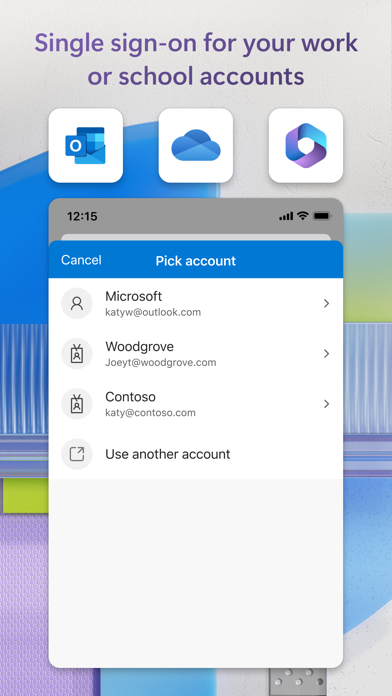
Sometimes your work or school might ask you to install the Microsoft Authenticator when accessing certain organization resources. You will need to register your device to your organization through the app and add your work or school account. Microsoft Authenticator supports cert-based authentication by issuing a certificate on your device. This will let your organization know that the sign-in request is coming from a trusted device and help you seamlessly and securely access additional Microsoft apps and services without needing to log into each.
Microsoft Authenticator may request the following optional permissions, which require your consent. You can continue to use Microsoft Authenticator without granting these permissions. However, some features may be limited or unavailable. For more information, please see below:
- Face ID: To enable app lock and help protect your accounts
- Camera: To scan QR codes when adding accounts to Microsoft Authenticator.
Getting started with multi-factor authentication
Multi factor authentication (MFA)provides a second layer of security. When enabled, during login after entering your password, you’ll be asked for an additional way to prove it’s really you. Either approve the notification sent to the Microsoft Authenticator, or enter the one-time password (OTP) generated by the app. The OTP codes have a 30 second timer counting down. This timer is so you never have to use the same time-based one-time password (TOTP) twice and you don’t have to remember the number. The OTP doesn’t require you to be connected to a network, and it won’t drain your battery. You can add multiple accounts to your app, including non-Microsoft accounts like Facebook, Amazon, Dropbox, Google, LinkedIn, GitHub, and more.
Getting started with passwordless
Use your phone, not your password, to log into your Microsoft account. Just enter your username, then approve the notification sent to your phone. Your fingerprint, face ID, or PIN will provide a second layer of security in this two-step verification process. After you’ve signed in with two factor authentication (2FA), you’ll have access to all your Microsoft products and services, such as Outlook, OneDrive, Office, and more.
Microsoft personal, work or school accounts
Sometimes your work or school might ask you to install the Microsoft Authenticator when accessing certain organization resources. You will need to register your device to your organization through the app and add your work or school account. Microsoft Authenticator supports cert-based authentication by issuing a certificate on your device. This will let your organization know that the sign-in request is coming from a trusted device and help you seamlessly and securely access additional Microsoft apps and services without needing to log into each.
Microsoft Authenticator may request the following optional permissions, which require your consent. You can continue to use Microsoft Authenticator without granting these permissions. However, some features may be limited or unavailable. For more information, please see below:
- Face ID: To enable app lock and help protect your accounts
- Camera: To scan QR codes when adding accounts to Microsoft Authenticator.
Screenshots


Recent reviews (US)
Rating
Show
★☆☆☆☆
15 Oct 2026
Hate it so much it makes me so mad
Never works properly and makes me beyond annoyed every single day.
★★★★★
15 Oct 2026
Excelente APK SEGURIDAD
Excelente funcionalidad, garantizando nuestra seguridad. Recomiendo su uso.
★☆☆☆☆
14 Oct 2026
Horrible app - avoid!
I loved it at first - made me feel safer. However, I upgraded my phone and cannot access my Microsoft files or one drive at all now. The Authenticator app provides a number to use for verification but it never works. I requested help and no one ever responds. Could someone please tell me how to access my files and delete this debilitating app?
★☆☆☆☆
14 Oct 2026
App is pathetic
I have tried for 30 minutes to sign in and this app does not work at all!
★★★★★
13 Oct 2026
Work related
It’s a lifesaver
Chart presence — 38 Top 100 positions
| Storefront | Category | Chart | Rank |
|---|---|---|---|
| Canada | Apps | Top Free | #7 |
| Ireland | Apps | Top Free | #8 |
| United Kingdom | Apps | Top Free | #11 |
| Belgium | Apps | Top Free | #13 |
| Switzerland | Apps | Top Free | #13 |
| Sweden | Apps | Top Free | #13 |
| Austria | Apps | Top Free | #14 |
| Germany | Apps | Top Free | #16 |
| Portugal | Apps | Top Free | #16 |
| Australia | Apps | Top Free | #19 |
| Latvia | Apps | Top Free | #19 |
| Estonia | Apps | Top Free | #23 |
| Greece | Apps | Top Free | #25 |
| Poland | Apps | Top Free | #25 |
| Netherlands | Apps | Top Free | #27 |
| Singapore | Apps | Top Free | #27 |
| France | Apps | Top Free | #29 |
| Spain | Apps | Top Free | #30 |
| Italy | Apps | Top Free | #30 |
| Slovakia | Apps | Top Free | #31 |
| Czech Republic | Apps | Top Free | #34 |
| United States | Apps | Top Free | #40 |
| Norway | Apps | Top Free | #41 |
| South Africa | Apps | Top Free | #48 |
| Croatia | Apps | Top Free | #52 |
| Lithuania | Apps | Top Free | #52 |
| Japan | Apps | Top Free | #54 |
| Iceland | Apps | Top Free | #56 |
| Finland | Apps | Top Free | #57 |
| Denmark | Apps | Top Free | #59 |
| Malaysia | Apps | Top Free | #68 |
| New Zealand | Apps | Top Free | #70 |
| Israel | Apps | Top Free | #75 |
| Romania | Apps | Top Free | #76 |
| Hungary | Apps | Top Free | #77 |
| United Arab Emirates | Apps | Top Free | #85 |
| Colombia | Apps | Top Free | #87 |
| Hong Kong | Apps | Top Free | #87 |
Ratings by country — 38 storefronts
| Storefront | Rating | Rating Count | Price |
|---|---|---|---|
| United States | 4.7 ★ | 712k | Free |
| United Kingdom | 4.6 ★ | 171k | Free |
| Canada | 4.7 ★ | 125k | Free |
| Australia | 4.7 ★ | 97k | Free |
| Germany | 4.7 ★ | 96k | Free |
| Netherlands | 4.5 ★ | 57k | Free |
| Japan | 4.4 ★ | 39k | Free |
| France | 4.7 ★ | 33k | Free |
| Switzerland | 4.6 ★ | 27k | Free |
| Spain | 4.6 ★ | 23k | Free |
| Colombia | 4.8 ★ | 21k | Free |
| Sweden | 4.5 ★ | 19k | Free |
| Italy | 4.7 ★ | 18k | Free |
| Norway | 4.4 ★ | 17k | Free |
| Belgium | 4.6 ★ | 17k | Free |
| New Zealand | 4.7 ★ | 17k | Free |
| South Africa | 4.8 ★ | 14k | Free |
| Singapore | 4.8 ★ | 13k | Free |
| Poland | 4.7 ★ | 12k | Free |
| Malaysia | 4.8 ★ | 11k | Free |
| Denmark | 4.5 ★ | 11k | Free |
| Ireland | 4.7 ★ | 11k | Free |
| United Arab Emirates | 4.8 ★ | 11k | Free |
| Hungary | 4.7 ★ | 10k | Free |
| Austria | 4.6 ★ | 10k | Free |
| Hong Kong | 4.6 ★ | 9k | Free |
| Portugal | 4.8 ★ | 9k | Free |
| Romania | 4.8 ★ | 7k | Free |
| Czech Republic | 4.7 ★ | 7k | Free |
| Finland | 4.2 ★ | 6k | Free |
| Israel | 4.7 ★ | 4k | Free |
| Greece | 4.8 ★ | 4k | Free |
| Slovakia | 4.7 ★ | 3k | Free |
| Lithuania | 4.7 ★ | 2k | Free |
| Croatia | 4.8 ★ | 1k | Free |
| Estonia | 4.8 ★ | 1k | Free |
| Latvia | 4.6 ★ | 1k | Free |
| Iceland | 4.5 ★ | 948 | Free |
Details
App Store data shown here is sourced from Apple's public iTunes RSS chart feeds and the iTunes Lookup API, collected by Zing at regular intervals. Figures may differ from Apple's internal App Store Connect analytics. Reviews are sourced from Apple's public customer-reviews feed (US storefront, most recent first).
Explore App Store Intelligence